 Snow Rider 3D Unblocked
Snow Rider 3D Unblocked
- Developer:
- snowrider-unblocked.github.io
- Rating:
- New
- Released:
- Technology:
- Unity WebGL iframe
- Platforms:
- Desktop, Chromebook, Tablet, Mobile
Game overview
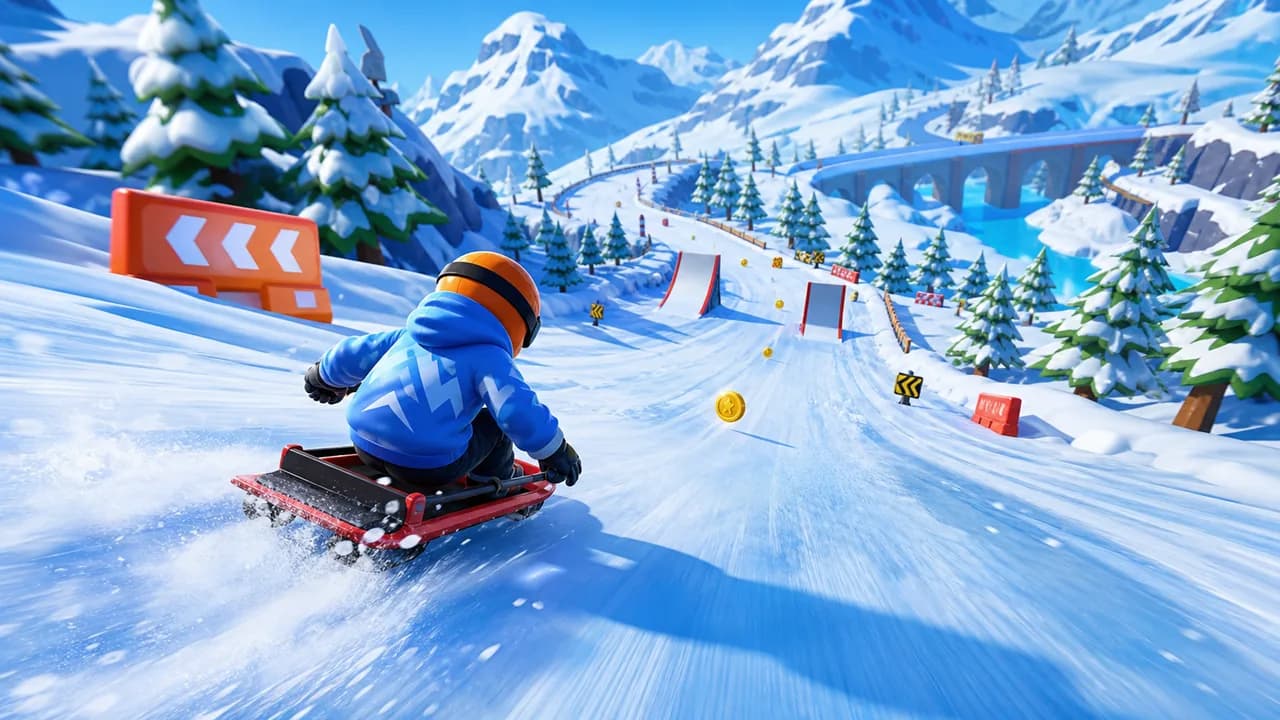
Play Snow Rider 3D Unblocked online for free. Steer down a snowy 3D slope, avoid obstacles, line up ramps, and push for a better downhill score.
How to play
- Click inside the player and wait for the Unity WebGL game to finish loading.
- Use the on-screen movement prompts to steer across the snowy track.
- Make small left and right corrections instead of holding one direction too long.
- Line up before ramps, narrow lanes, and obstacle clusters so the rider stays balanced.
- Restart quickly after a crash and use each run to learn the next safe route.
Route check
Plan a cleaner drive
Use this quick check before pressing play. It helps you choose a route, manage boost, and avoid wasting a run on a bad angle.
Choose a driving goal and route, then check the safest way to start.








Walkthrough
Snow Rider 3D Unblocked guide
Ride down snowy 3D slopes, dodge obstacles, use clean lines, and chase a longer winter run.
Play the snowy 3D slope online
Snow Rider 3D Unblocked is a winter downhill game built around speed, steering, and clean reactions. The run sends your rider down a bright mountain path where the track bends, obstacles appear ahead, and every correction needs to happen before the slope narrows.
The playable version loads as a Unity WebGL build from the Snow Rider GitHub Pages source. Open the frame, let the 3D scene finish loading, and focus on keeping a smooth line through the snow instead of making late emergency turns.
Because the game is embedded on this page, the main task is available before you reach the guide. Press play, wait for the frame to respond, and then use the notes below to improve the next run without leaving the browser page.
How Snow Rider 3D works
The core loop is simple: stay on the downhill route for as long as possible. The slope gives you forward speed, while your job is to read the next stretch of snow, avoid solid hazards, and guide the rider through open lanes before the camera catches up with a dangerous turn.
Ramps and uneven sections make positioning more important than raw speed. If you enter a ramp at a bad angle, the landing can leave you pointed toward a barrier or tree. A safer approach is to straighten the rider before takeoff, then make a small adjustment after landing.
The unblocked browser version works best when you treat each attempt as practice rather than a single all-or-nothing run. A crash still teaches where the route tightened, which side had more space, and how early the next dodge should begin.
- Watch the path ahead instead of staring only at the rider.
- Choose the widest safe lane when several obstacles are close together.
- Recover to the center of the track after every risky section.
Controls and first-run tips
Start by clicking inside the Snow Rider 3D player so the browser sends keyboard input to the game. Use the control prompts to steer left and right, then practice short taps. Small corrections are easier to recover from than wide turns at high speed.
During the first few runs, do not chase every risky opening. Learn how quickly the rider slides, how much space each obstacle needs, and how early you need to line up for ramps. Once the timing feels familiar, longer runs become more about rhythm than panic.
If the frame appears loaded but the rider does not move, click inside the play area once more before pressing the steering keys. Browser games inside iframes often need focus before keyboard input reaches the Unity scene.
- Tap lightly when the slope becomes narrow.
- Set your line before a ramp rather than turning on it.
- Avoid overcorrecting immediately after a landing.
Strategy for longer downhill runs
A strong Snow Rider 3D run usually starts with patient steering. Staying near the middle gives you more options when the next obstacle appears. Moving too far to one side can work for a single dodge, but it often makes the following turn harder because there is less room to correct.
Look for sequences, not single hazards. A clean first dodge should also leave you ready for the next ramp, barrier, or tree. If two routes look possible, choose the one that keeps the rider straight after the obstacle, because a stable exit is what keeps the run alive.
When the track becomes crowded, slow your decision-making even though the sled keeps moving quickly. Pick the safest visible lane, commit to it, and avoid switching sides at the last second unless a hazard fully blocks the route.
Unblocked access and device notes
Many players search this title because they want a quick winter racing game on a Chromebook, school laptop, or shared desktop. The page is set up as a play page rather than a download page, so the Unity frame, controls, and route notes stay together in one place.
Access can still depend on the network. A school, work, or public filter may block the GitHub Pages game files even when this site loads normally. If the frame stays blank, refresh once, try a modern desktop browser, or return from a less restricted connection.
Desktop play is usually the cleanest option because physical keys make small steering taps easier. Tablets may load the 3D scene, but touch behavior can vary by browser, screen size, and whether the embedded game exposes mobile controls.
Downhill route planning
Before trying to beat your best score, set a smaller goal for the next run. You might practice staying centered for thirty seconds, taking only wide ramps, or recovering smoothly after every landing. Simple goals make progress easier to read.
Route planning matters because the safest line is rarely the flashiest line. A narrow gap may save time for a moment, but a wider lane often leaves better recovery space after the obstacle. Choose the path that keeps the rider balanced for the next two moves, not only the current dodge.
Use the route check tool above the guide when you want a quick starting plan. Pick a driving goal, choose the route type, and use the recommendation to decide whether to scout carefully or push for a higher-risk downhill line.
Common mistakes to avoid
The most common mistake is holding a steering key until the rider drifts too far. Short taps give you more control, especially when trees, fences, and ramps appear close together. If you miss a line, reset your position mentally and aim for the next open lane instead of trying to fix everything at once.
Another mistake is treating ramps as automatic rewards. A ramp is useful only when the approach is straight and the landing area has room. If the angle looks wrong, passing the ramp can be smarter than jumping into a crash.
Players also lose runs by watching the rider instead of the course. Keep your eyes slightly ahead of the sled so obstacles enter your plan earlier. That habit gives you time to choose between a small correction, a wider lane, or a safer reset after landing.
Score-building practice routine
A useful practice routine starts with consistency. Spend one run avoiding ramps, one run taking only clear ramps, and one run focusing on recovery after each obstacle cluster. Separating those goals makes it easier to notice which part of the downhill route is costing the most distance.
After a few attempts, compare what failed. If crashes happen before ramps, work on approach angles. If crashes happen after jumps, focus on landing recovery. If narrow lanes are the problem, return to center earlier and leave more room for the next turn.